One-Photo Product Ads
No idea what video ad to make, no time to film, and worried you’ll waste credits on AI clips you can’t use?
Straight talk for busy online sellers. You already have the product photo. What you don’t have is a plan for the ad. Keep reading and you’ll see how to turn that one photo into a finished 12–15-second TikTok or Reels ad: no filming, your real photo as the starting point, and the credit cost shown before you spend one.
For $19 you get The No‑Guesswork Ad Coach and 18 ad templates. You paste the coach into the AI chat you already use, and it plans your ad with you.
$19 USD · one-time
Get The No‑Guesswork Ad Coach · $19Secure checkout by Whop. Instant download after payment.
$19 once. You also need your own Higgsfield plan. On 22 Nov 2026, a typical pack ad (2 clips plus a free end card) came to about 50 credits (Seedance 2.5 Flash) or about 60 (Seedance 2.0, in the US), and a 3-clip ad like Isla Fuego about 75–90, before retries.
Higgsfield plan not included (Starter was $15 a month on 22 Nov 2026). See everything you’ll need ↓
Already make AI videos? Skip the setup and read the short version for ad pros.
Short on time? Jump to what you get and the price ↓
Got a product photo and still no video ad? Read the next part. It’s about you.
Let’s be blunt about why you still don’t have a video ad.
It isn’t laziness. It’s three problems, and they stack on top of each other.
Problem one: you don’t know what to film, or what to say. So you stare at the product. You scroll other sellers’ ads. An hour goes by. You still have no idea where to start.
Problem two: you don’t have time to film. So you give up a weekend. You style it. You shoot it. You shoot it again. Sunday night you have a phone full of clips and nothing you’d post.
Problem three: the AI shortcut costs you. You type a prompt. You pay the credits. The text on your label comes back as gibberish. The product spins or changes shape. You try again. More credits. Still a video you can’t use.
None of that means you’re bad at this. Nobody handed you a plan.
Meanwhile the product is still sitting there, with no video.
Sound familiar?
There’s a simpler way: a coach that tells you what to make.
Templates alone leave you with the same old question: which one, for my product, in what order?
The way I found starts from the product photo you already have. I call it photo-first, motion-only. It took me months to find it.
I work with more than 20 paint and coating products: anti-corrosion coatings, two-part epoxies, specialty finishes. Many solved problems better than what customers were used to, but customers didn’t know it. Store staff were too busy to explain them, and marketing didn’t know the technical side.
So I tried AI video. Several platforms, a lot of YouTube tutorials, a lot of wasted credits. Nobody showed how to set it up for a product like mine, and the video quality was rougher then. It took me three to six months of trial and error.
Then it clicked. Start from the real product photo and let the AI add only the motion. Use the product’s real facts to find the problem it solves. Keep each video short, and make several.
For my products, that brought more phone calls, more WhatsApp messages, more people into the store, and more sales.
One example, at the company I work for: after we made and posted a video ad for one specific product, sales of that product went up 25%. We also downloaded the ad’s AI voiceover as an mp3 and sent it to a radio station, and it ran as a radio promo.
That’s my result, for one product, in my market. It isn’t a promise. Yours will depend on your product and who sees your ads.
You may not sell coatings. But if your product needs a few seconds of explaining, the problem is the same.
That’s why the Ad Coach asks for your data sheet or spec sheet, if you have one. It finds the problem your product solves and writes the hook and script in plain words, using only the facts on your sheet.
I also learned that people stop reading long guides. Most business owners don’t have six months.
What you actually need is somebody who asks what you sell, picks the angle, lays out every shot, and tells you what it will cost.
So that’s what I built.
With a text prompt, you describe your product in words. Then the AI has to guess what it looks like and draw it from scratch, and that’s often when labels get warped and logos come out misspelled. This pack works the other way around. Upload a photo of your product. Then just tell the AI what should move, like a drop sliding or the camera moving closer. The AI starts from your photo instead of redrawing your product from words, and mostly just adds the movement. So your product stays much closer to the way it looks in the photo. We call it photo-first, motion-only.
Photo-first, motion-only is the method. The coach is how you use it without learning it all first.
If you take one thing from this page, take this: you don’t need a camera crew or a lucky prompt. You need one good photo of your product and a plan. The coach gives you the plan.
John Theysen, One-Photo Product Ads
Meet The No‑Guesswork Ad Coach.
In plain words: the coach is a block of text you paste into ChatGPT (or a similar chat). Then the chat becomes your ad coach. It asks about your product and tells you what to do next, one step at a time. It doesn’t make the video. It tells you exactly how.
Here’s what it does, and why:
The PDF and the coach are two different files. The PDF is the playbook: 18 templates, prompts, settings, credit costs and platform rules. The coach is a short text file you paste into the chat. It reads the PDF for you and tells you exactly which plays to run for your product.
- Every ad follows the same simple order. The first 3 seconds show your product and the hook. The middle shows it working, or why it’s worth it. The last few seconds tell people what to do next, like “tap to buy”. So you’re never starting from a blank page.
- It asks first. What you sell, where you’ll post, who’ll see it (followers or strangers), your style, voice and credit budget. One question at a time, or say “just pick for me”.
- It checks your photo before you run a clip, and only uses a template your photo actually fits.
- It suggests ideas, or ranks yours next to its own picks, one line each, so you choose.
- It plans every clip with the cost. The exact prompt from your PDF, the settings and the credit number to check on the button. It never spends credits for you.
- It checks before you post. The label in each clip, your hook in the first 3 seconds, captions off the product, music you’re allowed to use, and the ad rules of the platform you post on first.
- Creative Testing plans 3 ads from one photo, each answering a different buyer question: “Does it work?”, “Is it for someone like me?” and “Why this one?”. It starts with the cheapest and gives you a simple log for views, clicks, sales and spend, so you can compare what each ad cost with what it sold.
See everything the coach does
- Two paths: one ad (Quick Start) or 3 ads from one photo (Creative Testing).
- Up to 9 short questions, one at a time; it skips what you already said.
- Reviews one photo or several and flags blurry, cropped or unreadable-label shots, with a reshoot tip.
- Makes a scene photo from your product photo if your idea needs a setting, and checks the label letter by letter.
- Suggests 3 ideas, or ranks yours next to two of its own.
- Technical product? Reads your data sheet or key facts for the angle and script.
- Person in the ad: product only by default; a photo list if it’s you; consent and AI-label rules for anyone else.
- Plans 2 clips plus a free end card (a third only with a different scene photo) and the credit cost.
- Pastes the exact prompts from your PDF, one clip at a time, with a label check after each.
- Walks you through a fix when a clip comes out wrong, and tells you not to keep spending on a weak photo.
- Recommends voice or no voice, then free (CapCut) or paid (ElevenLabs Starter) voices, plus a timed script and captions.
- Screenshot help: paste your screen and it tells you what to tap.
- Free end card, CapCut finish, and music you’re allowed to use.
- The pre-post checklist for the platform you post on first, then a caption and hashtags.
- Flags health, earnings and misleading claims, fake reviews and fake urgency, and offers a version that fits.
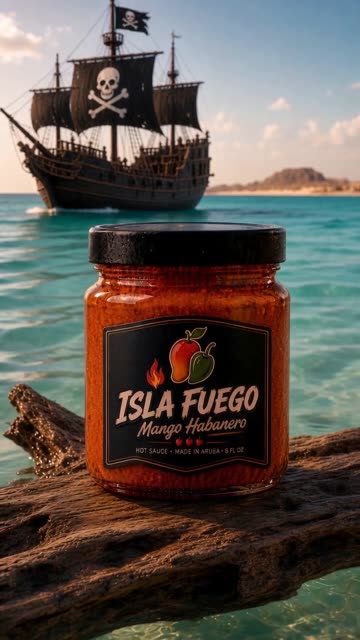
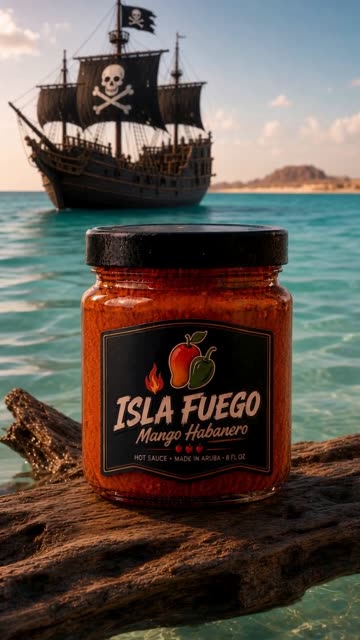
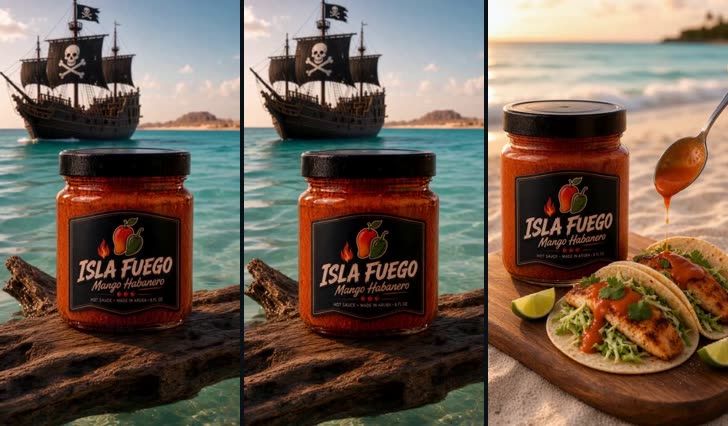
One thing to know up front: a 12–15-second ad is not one clip. Each Higgsfield clip in the pack is 4–5 seconds. The coach tells you how many clips to make and in what order: usually 2 clips plus a free end card, and a third only when you have a different scene photo for it, like the Isla Fuego ad. Then you stitch them together in CapCut.
Almost done: now add words, voice and music.
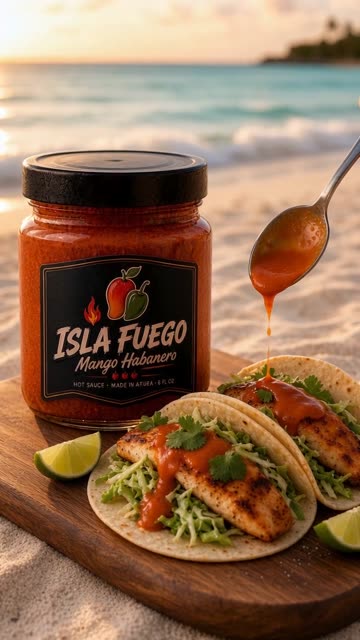
Have an idea? The coach turns it into scenes and clips built around your real product photo, and ranks it next to its own picks so you can choose. No idea yet? It suggests a few that fit your product, like the taco shot in the Isla Fuego example below.
- “AI video will wreck my label or waste my credits.” The clip starts from your real photo, the coach checks that photo first, and the fixes guide covers a clip that comes out wrong.
- “I’m not an ad person.” You answer a few short questions; the coach hands you the idea, the script and the clip plan, one step at a time.
- “The costs and rules will trip me up.” You see the credit number before you tap, and the coach runs the pre-post check for the platform you post on first.
Using it is the easy part. Open your favorite AI chat (ChatGPT, Claude, Gemini or Grok), attach the pack PDF, paste the coach in, and answer its questions.
To be clear: it doesn’t make the clips or edit the video for you. You run the clips in Higgsfield and finish in CapCut. The coach tells you how, one step at a time. Prefer to work alone? Follow the PDF yourself. Both ways are in the $19 pack.
Follow the PDF
The 18 templates, the PDF guide, and the CapCut guide. Open the guide, pick a plan, paste the prompt, and finish in CapCut.
Use The No‑Guesswork Ad Coach
Attach your PDF, paste the coach in, answer a few short questions. It takes you to your first 12–15-second ad, one step at a time. Want options? Turn on Creative Testing for 3 different ads from one photo.
Example conversation: making the Isla Fuego ad (shortened)
I’ll guide you step by step. I won’t make the video for you.
1 Quick Start - one 12–15-second ad, the usual flow
2 Creative Testing - 3 ads from one photo, each a different angle, so you can compare
You can also say ‘just pick for me’.
1
First, what are you selling? Type the product and the brand name if you have one, and attach a photo if you have it.
1. Food or drink
2. Beauty or skincare
3. A gadget, case, or tool
4. A cleaner or fix-it product
5. Other
You can answer a few things at once, or say ‘just pick for me’ on later questions.
Isla Fuego Mango Habanero hot sauce. Here’s my jar photo, it’s the only one I have. TikTok, mostly strangers, a fun pirate vibe. Could the jar float on driftwood with a pirate ship behind it? I’m new to Higgsfield and can spend about 90 credits.
What should the ad make people feel or do?
1. Crave it (taste, texture, mood)
2. See it work
3. Fix a problem
4. Just look premium
5. Just pick for me
6. Other
1
Do you want a voiceover? My pick for you: hot sauce is simple and visual, so music plus short on-screen words works well, and the ad still works when people watch with the sound off. A voice helps more when a product needs explaining.
1. Yes, I’ll record my own voice
2. Yes, I’ll use CapCut’s built-in AI voices (free)
3. Yes, I’ll use ElevenLabs Starter (paid, about $6/month as of Nov 2026)
4. No voice, captions only
5. Just pick for me
6. Other
Heads-up: ElevenLabs’ free plan has no commercial license, so don’t use free renders in an ad.
2. I want a pirate narrator.
A pirate narrator fits the story. Please attach One-Photo-Product-Ads.pdf from your pack, so I can look up the exact template prompts. ChatGPT’s help page says free accounts can upload 3 files a day, so let’s stay in this chat.
Attached.
You already have an idea, so here it is next to two of mine, best first:
1. Your pirate scene (Templates 13 and 08): a story in the first second and the label front and center. Needs one AI scene photo.
2. Sauce poured on food (Template 13): people can almost taste it. A good second shot; less of a hook on its own.
3. Close-up with one small drop on the jar (Template 17): cheapest and simplest, but less story.
These are recommendations, not guarantees. Which one? Reply 1, 2, 3, or your own.
1, with the taco shot from 2.
Here’s what we’ll make:
A 15-second Crave ad for Isla Fuego on TikTok, fun pirate tone.
First, two scene photos made from your jar photo, with the jar and label kept as they are: your idea, the jar on driftwood with a pirate ship behind it, and from idea 2, your sauce poured over fish tacos on the beach.
A 15-second ad is not one clip. You’ll make 3 clips, one at a time, in this order:
1. Template 13 on the ship photo, set to 5 seconds
2. Template 08 push-in on the ship photo, 5 seconds
3. Template 13 on the taco photo, set to 5 seconds
Then you stitch and trim them in CapCut with a 0-credit end card (Template 12), to about 15 seconds.
AI pirate voice and AI-made scenes, so turn on TikTok’s AI-generated content label when you post. About 75 credits (about 90 in the US); a retry adds about 25-30.
Sound good?
Yes.
Here’s the path: 1 photo check, 2 clips in Higgsfield, 3 end card, 4 words, 5 CapCut, 6 export and post. I’ll tell you which step we’re on.
Step 1 of 6: Your jar photo is sharp, upright, label facing the camera. Good start. Now the ship scene. Want me to make it from your jar photo? I’ll keep the jar and label exactly as they are and change only the setting: driftwood on turquoise water, a pirate ship behind, nobody on board.
Yes please.
Here it is. I compared the label with your photo letter by letter: ISLA FUEGO, Mango Habanero, same colors and shape. The deck is empty, good: people in the background tend to warp. Next, the taco shot: the same jar next to grilled fish tacos on the beach, a spoon pouring the sauce over them, the sauce kept off the label. Make it?
Yes.
Here’s the taco shot. The label matches your photo and the sauce stays off it. You now have two start photos.
Done? Reply yes / stuck.
yes
Step 2 of 6: Clip 1, Template 13 First-Second Proof Cut, shot 1. Upload the ship photo with +, then paste:Static camera, very slight push-in; the product stays still and sharp with the label unchanged.Seedance 2.5 Flash (in the US, Seedance 2.0), 720p, 9:16, 5s, sound off. Check the number on the button first: about 25 credits (about 30 on Seedance 2.0). Read the label in the first, middle and last second.
Done? Reply yes / stuck.
Show the rest of the conversation (steps 3–6)
… clips 2 and 3, then Step 3 of 6, the end card …
Step 4 of 6: Your words, for the pirate voice:
0-5s: “Arr! The scallywags lost their treasure! Isla Fuego, Mango Habanero.”
5-10s: “Sweet mango, then slow-burnin’ habanero fire.”
10-15s: “It’s washed ashore in Aruba, so grab yours. Shop now!”
Captions, at the top of the screen and off the jar:
ARR! LOST THEIR TREASURE!
ISLA FUEGO, MANGO HABANERO.
SWEET MANGO, HABANERO FIRE.
WASHED ASHORE IN ARUBA.
End card: Isla Fuego · Shop now
Done? Reply yes / stuck.
… Step 5 of 6, CapCut, and Step 6 of 6, export and post …
A shortened, written example. The real ad started from one jar photo; the pirate scene (the seller’s idea) and the taco shot (the AI’s suggestion) were made by AI from it, then animated with the pack’s templates. It was not made in a coach session, and some scene details were added to the prompts by hand. Isla Fuego is a fictional brand.
The coach is for pack buyers and unlocks with the PDF in your download. Open any AI chat (ChatGPT, Claude, Gemini, or Grok), attach the PDF, and paste the prompt. The coach does not make the video for you. This pack is not affiliated with ChatGPT, Claude, Gemini or Grok. Not made or endorsed by Higgsfield.
That’s the coach. It comes in the pack, with the PDF it reads from.
$19 once, plus your own Higgsfield plan.
18 ad ideas, written out shot by shot, ready for your photo.
Here’s what “ready” means. Each template is one ad idea, written out for you: the motion, the 15-second beat sheet, the settings, the hook lines, its estimated credit cost and a “check before you post” list. The prompt describes only the motion, not your product, so your photo and label are more likely to stay as they are. The Product Matchmaker tells you which ideas fit a bag, a bottle, a box or a jar. You paste the prompt with your product photo as the start frame, and finish in CapCut. No video shoot. No guessing.
Tap a group and see for yourself.
Crave · 6 templatesMake them want it: texture, gloss, pours, steam. For food, drinks, beauty and treats.
-
03 Texture Macro
A very slow glide across the surface with grazing light.
Best for: Paint, creams, skincare, fabric See an example ↓
-
06 Pour & Settle
A slow, clean pour that settles. The camera stays still.
Best for: Drinks, sauces, oils, paint, powder mixes
-
14 ASMR Hands Unbox
Two hands open the pack and pour a little out, slow and close.
Best for: Snacks, food, supplements, gift boxes
-
16 Exploded Ingredients
The product separates into its parts or ingredients, then rebuilds.
Best for: Food, supplements, pet treats, gadgets
-
17 Hero Drop Moment
A droplet, condensation or a mist puff in slow motion.
Best for: Cold drinks, serums, beauty, fragrance See an example ↓
-
08 Outdoor / Island Light
A handheld-feel push-in with warm sun, water or leaves moving.
Best for: Outdoor, beach and lifestyle products See an example ↓
Show it working · 5 templatesLet the product do its job on camera. For gadgets, kits, apps, furniture and decor.
-
02 Unbox Reveal
The lid lifts, the product appears, a gentle push-in.
Best for: Kits, gift sets, boxed electronics
-
04 Lifestyle Desk
A subtle push-in on the product in a real setting.
Best for: Gadgets, tools, desk items, candles See an example ↓
-
09 App / SaaS Mock
A slow push-in on your device. The screen stays exactly as shot.
Best for: Apps, software, dashboards
-
10 UGC Selfie Style
A hand tilts the product toward the lens, phone-camera feel.
Best for: Creator-style product ads
-
18 Room Drop-In
A smooth eye-level pan through a room with your piece in it.
Best for: Furniture, lamps, rugs, decor, plants
Problem then fix · 2 templatesA quick “ugh” moment, then the fix. For cleaners, coatings and fix-it products.
-
05 Before / After Surface
One clean wipe reveals the fresh finish behind it.
Best for: Paint, coatings, cleaners, restorers
-
13 First-Second Proof Cut
Product, the problem, the result, the result again, in quick cuts.
Best for: TikTok Shop, Reels, paid social
Fits any ad · 5 templatesHero shots, brand moments and the closing card. Pair with any of the stories above.
-
01 Label-Safe Hero
Slow push-in with a small 15° arc. The label stays facing the camera.
Best for: Jars, bottles, cans, cosmetics, candles See an example ↓
-
15 Zero-Gravity Float
The product lifts a few centimeters, hovers, turns slightly, settles.
Best for: Skincare, earbuds, watches, small premium items See an example ↓
-
07 Shelf Stopper
Your product slides forward from a shelf into a spotlight.
Best for: Retail packs, CPG, paint cans
-
11 Color Splash Brand
Your brand color swirls around the product, then clears.
Best for: Bold brand colors, CPG
-
12 End Card CTA
A slow light sweep behind your product and logo for the last seconds.
Best for: The closing shot for any template
All brands on this page are fictional. AI results vary from run to run, so check every clip before you post, especially the last second.
One payment. No subscription. You bring your own Higgsfield plan and credits.
Already making AI video ads? Here’s the short version.
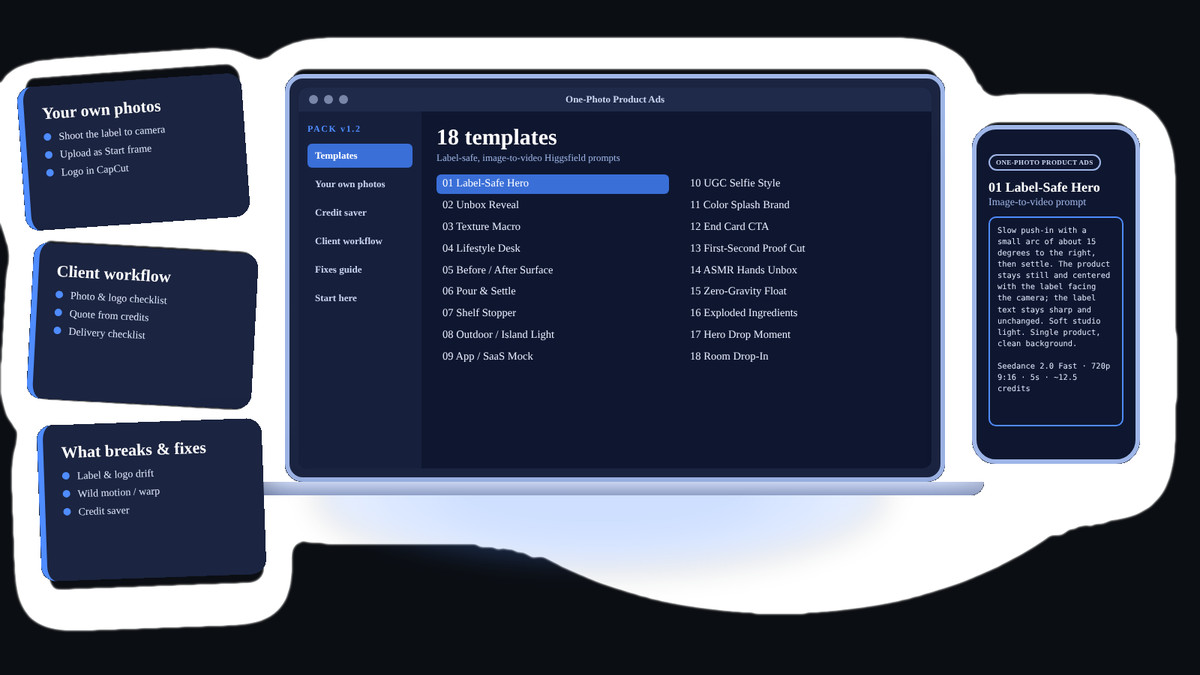
You know the problem: the label comes back warped and the credits are gone. This pack is 18 image-to-video prompts that describe only the motion, not your product, so the model has less reason to redraw your label. Each comes with settings, a credit estimate and checks before you post.
Here’s one of the 18, word for word. Template 01, Label-Safe Hero. Upload your product photo, then paste:
Slow push-in with a small arc of about 15 degrees to the right, then settle. The product stays still and centered with the label facing the camera; the label text stays sharp and unchanged. Soft studio light. Single product, clean background.
Settings: Seedance 2.5 Flash, 720p, 9:16, 4–5s (each template lists its length), sound off (in Settings or on the prompt bar, depending on the model): about 25 credits a take. In the US, where Higgsfield lists Flash as not available, Seedance 2.0 at 720p was about 30 (Generate button, 22 Nov 2026).
Planning with retries? The full credit costs are in Let’s talk money ↓, and each template lists its own.
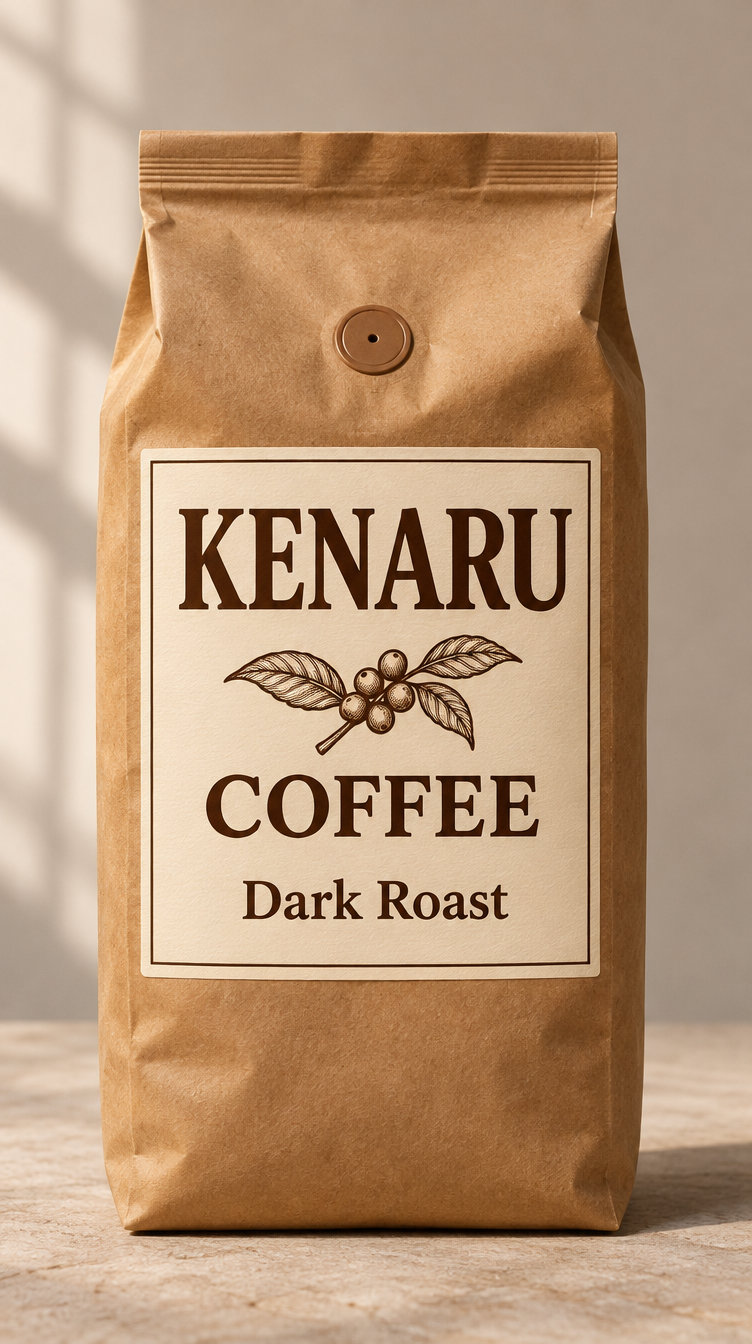
Two examples: the start photo, and the clip it became
Don’t take my word for it. Look at the label in the photo. Then look at it in the clip. Both are worked examples from the pack, and both brands are fictional.
Kenaru Coffee
Isla Fuego
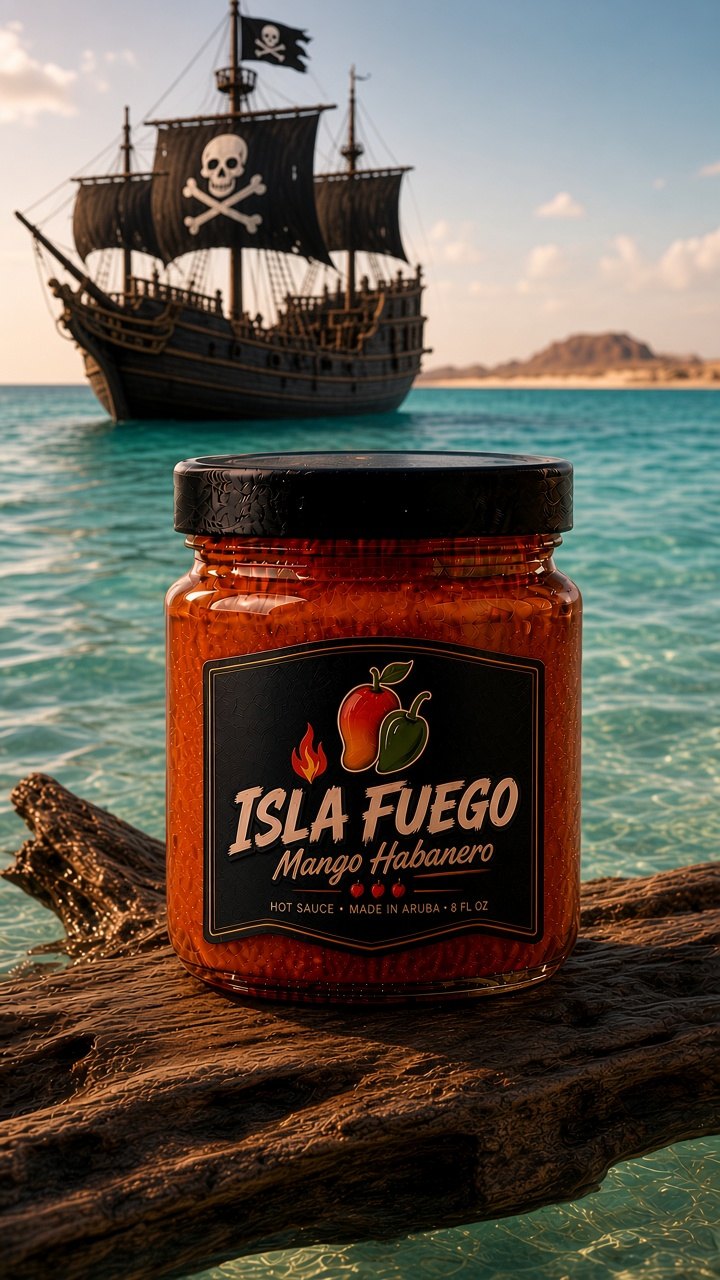
AI results vary from run to run. Check the first, middle, and last second of a clip before you post.
Five more templates. Five other products. Same one-photo start.
Made in Higgsfield with earlier (v1.1) versions of these templates, adapted to each product, no editing. All brands are fictional.
When a clip comes out wrong, here’s what you do.
AI clips don’t always come out right. Here’s a real one that didn’t, and the steps from the pack that fixed it.
Look at the cold can in Template 17 above: the drop swells into a fat bead and runs down the side. The early prompt said “fat droplet”, started from text instead of a photo, and ran 10 seconds.
Who fixed it? Not the AI on its own. We followed the pack’s fixes guide, the same steps you would take:
- Spot it. Pause the clip in the middle and at the end. The drop is too big.
- Look it up. Open the fixes guide, problem 10: “An effect comes out too big” (added in v1.3.10). Or tell the coach: “the drop is too big”.
- Change three things. The guide, or the coach, tells you what:
- “fat” becomes “small”, with a size to compare: “only a little bigger than the condensation beads around it”
- start from a photo; here, the first frame of the old clip
- keep it at 5 seconds
- Paste and run it once. Paste the corrected Template 17 prompt below. Check the number on the button first; here it was 25 credits.
- Check it. Is the drop small? Is the label clear in the first, middle and last second?
The corrected Template 17 prompt:
In slow motion, one small droplet, only a little bigger than the condensation beads around it, slides a short way down the edge of the can, small and subtle next to the product, catches the backlight. Locked-off camera, slow push-in. The effect stays small; the label stays clear, sharp and unchanged.
The result:
AI results vary from run to run. Check the first, middle, and last second of a clip before you post. Tidepool is a fictional brand.
One ad isn’t enough. You need a steady lineup.
You’ve seen one ad come together. A business doesn’t run on one video. You need different ads for TikTok, Reels and Shorts. Different hooks for different buyers. Fresh angles when the old ones go stale.
Make every one of those from scratch and you’re right back to guessing, filming and paying for clips you can’t post. Every single time.
With The No‑Guesswork Ad Coach you don’t start from scratch. Same product photo. New angle. New hook. New shot plan.
When an ad wears out, run Creative Testing again on the same photo for new hooks and angles. And a new hook on the clips you already have costs 0 credits: just a recut in CapCut.
- 18 templates give you 18 different ad ideas to pick from.
- Creative Testing plans 3 different ads from one photo in a single session.
- The ad scripts give you 20 hook lines and 5 script styles, so each version can open differently.
More clicks don’t prove more profit; judge on sales once you have enough data.
The planning happens in a chat, not over a weekend of filming. Your first ad takes an afternoon, about 2–3 hours, and most of that is one-time setup: signing up and learning the CapCut edit. After that, you skip the setup.
So stop guessing. Stop paying for clips you can’t post. Build your arsenal of ads, one photo at a time.
Here’s exactly what you get for $19. No fluff.
- 18 video ad templates for TikTok, Reels, Shorts, and paid social. Each one has a beat sheet, a short text instruction for Higgsfield that describes only the motion, not your product, model and settings, and a “check before you post” list.
- The Product Matchmaker — a 15-second plan by product type, so you know which templates to use for a bag, a bottle, a box, and the rest.
- The fixes guide — what to do when a label drifts, a clip warps, or the motion gets wild.
- Credit cost on every template — plus a credit-saver method: get the still right, then animate once.
- Ad scripts with hooks — the 15-second structure, hook lines, and scripts with shot timing.
- Use-your-own-photos guide — phone photo, start frame, logo in the editor.
- Finish-in-CapCut guide: voiceover, captions, music — assemble 2–3 clips into a finished 12–15-second TikTok or Reels ad.
- 4 original background music tracks made for this pack, one for each ad style. Use them in your ads and in client ads.
- The No‑Guesswork Ad Coach — a step-by-step coach prompt for pack buyers. It works with ChatGPT, Claude, Gemini, or Grok. It’s the short text file you paste into the chat next to your PDF, and it walks you through. Its Creative Testing mode plans 3 different ads from one photo. It does not make the clips or edit the video for you.
- A 70-page PDF of everything, the coach prompt, and a short read-me that shows which file to open first. The separate guide files are in an extras folder, for copy-paste on a computer.
- Platform rules (checked Nov 2026) — a short guide to TikTok, Meta and YouTube’s own published ad rules, with official sources and a pre-post checklist for each. The coach runs the one for the platform you post on first. Not legal advice; rules change, so re-check the live policies before you run an ad.
- Client workflow — a file checklist to send clients, a simple way to quote from credit costs (credits × your cost per credit, plus a buffer for re-runs and your time), and a delivery checklist for 9:16, 1:1 and 16:9 versions.
- Made for vertical 9:16 (TikTok, Reels, Shorts). The client workflow also shows how to make 1:1 and 16:9 versions.
- On-brand by design: Template 11 uses your brand color, your real logo goes on the end card, and logos are added in CapCut, not by the AI, so they stay exact.
- Use it for your own products or for paid client ads, with up to 3 people on your team.
Credit costs are estimates read off Higgsfield’s Generate button on 22 Nov 2026, before retries. The tool shows the exact cost before you run a clip. A Higgsfield plan and credits are not included. You pay Higgsfield directly. AI results vary from run to run.
“Why not just use Higgsfield’s Marketing Studio?”
Already use Higgsfield? This part is for you. New to it? You can skip ahead to “Who this is for”.
Fair question. Straight answer. Marketing Studio is fine when you want a one-click ad: pick a template, add your product, done. This pack works inside Higgsfield too. Use it when you want your own photo to lead, and control over every shot.
Credits: on 13 Nov 2026, a 15-second Marketing Studio video at 720p showed 75 credits. A typical 2-clip pack ad costs less, and a 3-clip ad about the same or a little more (see Let’s talk money ↓). What you get is your own photo and control over each shot. Each clip you run again adds about 25–30 credits. Check the button for the exact cost.
Your photo is the start frame: the clip begins from the product photo you took, label facing the camera, and the prompt describes only the motion, not the product. That makes a rewritten label less likely. AI results still vary, so check every clip before you post.
Use both if you like. Marketing Studio for quick ideas. This pack for the ads where your real label has to be right.
Credit costs read off Higgsfield’s Generate button on 22 Nov 2026: Seedance 2.5 Flash, 720p, 9:16, 5 seconds, sound off, 25 credits (outside the US); Seedance 2.0, 720p, 9:16, 5 seconds, 30 credits at list price (US). Higgsfield’s changelog says Seedance 2.5 Flash is currently not available in the US. GPT Image 2.6, 1k, medium, 0.5 credits (13 Nov 2026). Marketing Studio: 75 credits (13 Nov 2026). Prices change and some templates cost a different amount. The button always shows the exact cost. The start-frame step works from Higgsfield’s Starter plan; the optional end-frame tips use Start & End Frame control, which Higgsfield lists on Plus and up (checked 15 Nov 2026). This pack is independent: it isn’t made or endorsed by Higgsfield.
$19 USD · one-time
Get The No‑Guesswork Ad Coach · $19Who this is for. And who should keep their $19.
For
- Small online sellers on TikTok Shop, Shopify or Etsy, and Amazon sellers who promote on social, who need short 12–15-second ads for their own products, from one product photo, without a video shoot. It’s most useful when you’re launching a new product, refreshing a listing that has no video, or need a fresh set of ads for next week.
- Already pay UGC creators? Use this for the product shots in between: new angles from one photo, without booking another video.
- Local shops and small product businesses that post on Instagram, Facebook or TikTok and want people to call, message or come in.
- Freelancers and small agencies making ads for clients. That’s covered, for up to 3 people on your team.
Not for
- Anyone who wants a done-for-you video. This is a prompt and workflow pack. You still run the clips. If you want someone else to do it all, this isn’t it.
- Anyone who doesn’t want to use — or pay for — an AI video tool. A Higgsfield plan and credits are not included.
- Anyone looking for a promise about sales, views, or earnings. I won’t make one.
Let’s talk money. All of it.
Here’s what the usual routes to a short product video cost. These are typical published prices, from the companies’ own pages. Read them, then decide.
- Production company, social media product teaserstarting around $500 per video
- UGC creator through Billo, 15-second videofrom $99 per video, bought in packs from $1,000
- Freelance video editor on Upwork (editing only, you supply the footage)about $10 to $40 an hour (median, entry to mid tier)
- This pack, with The No‑Guesswork Ad Coach$19 once, plus your own Higgsfield credits (below)
Straight talk: those routes buy different things. A crew. A real person on camera. An editor’s hours. This pack doesn’t replace them, and I won’t pretend your clips will look like a production company’s. What it gives you is the plan, the prompts and the coach, so you can make your own ads, as many as you need, for $19 once plus credits.
Why only $19? Because you’re buying files and a coach prompt, not a service. There’s no crew, no editor and no per-video work on my side.
That’s every cost, laid out in the open. Fair?
Now the part some sellers leave out: you still pay for the credits you use in Higgsfield. On 22 Nov 2026 a 5-second clip at 720p, 9:16, was about 25 credits on Seedance 2.5 Flash, or about 30 on Seedance 2.0 in the US, where Higgsfield lists Flash as not available. A typical still is about 0.5 credits. A typical pack ad (2 clips plus a free end card) is about 50 credits, or about 60 in the US; a 3-clip ad, when you have a different scene photo for the third clip, is about 75–90. All before retries; each clip you run again adds about 25–30. Those are estimates (Higgsfield’s Generate button and changelog, 22 Nov 2026); the button always shows the exact cost before you tap.
Cheapest way to start: $19 for the pack plus $15 for one month of Higgsfield Starter (200 credits, 22 Nov 2026). That’s about 3 to 4 typical 2-clip ads before retries (about 3 in the US), or fewer if you add retries or a third clip.
At Starter pricing (22 Nov 2026), a typical 2-clip ad is about $3.75 of credits, or about $4.50 in the US, before retries.
Typical published prices, checked 21 Nov 2026, US dollars: Vidico, “Product Video Cost in 2026” (social media product teaser, budget tier $500–$1,500); Billo pricing page (videos start at $99 for 15 seconds; packs from $1,000); Upwork, “How Much Does Hiring a Video Editor Cost?” (median $10/hr entry level, $40/hr mid tier). Prices change. Your cost depends on your scope.
Straight answers to fair questions
Do I need a Higgsfield account?
Yes. No way around it. This pack is a set of templates and guides, not the video tool itself. You need a Higgsfield plan and credits, which are not included. Most prompts also work in other image-to-video tools that accept a start frame, but the credit costs and settings in the pack are written for Higgsfield.
I’ve never used Higgsfield. Is this too technical for me?
It’s built for that. One of the first things the coach asks is whether you’ve used Higgsfield before, and if you say you’re a beginner it takes you one step at a time. Stuck on a screen? Paste a screenshot into the chat and it tells you what to tap. Plan on about 2–3 hours for your first ad, including sign-ups and learning the CapCut edit. Later ads go faster. You still need a Higgsfield plan and credits, which are not included.
What’s The No‑Guesswork Ad Coach?
It’s a short text file: a copy-and-paste coach prompt for pack buyers, with a Creative Testing mode for 3 ads from one photo. It works in ChatGPT, Claude, Gemini, or Grok. The PDF is the playbook; the coach reads it for you. Open any AI chat, attach the pack PDF from your download, and paste the coach. It asks a few short questions, then gives you the exact prompt to paste, checks the clip with you, and walks you through CapCut. ChatGPT’s help page says free accounts can upload 3 files a day (read 22 Nov 2026), so stay in one chat. Out of uploads? Use Claude, Gemini or Grok, or wait a day. The coach does not make the video for you. An AI chat account is not a Higgsfield account; you still run the clips and pay for credits separately. Both the do-it-yourself PDF path and the coach are included in the $19 pack.
What does a clip usually cost in credits?
On 22 Nov 2026 a 5-second clip at 720p, 9:16, was about 25 credits on Seedance 2.5 Flash, or about 30 on Seedance 2.0 in the US, where Higgsfield lists Flash as not available. A typical still (for example a GPT Image start photo) is about 0.5 credits. A typical pack ad (2 clips plus a free end card) is about 50 credits, or about 60 in the US; a 3-clip ad like Isla Fuego is about 75–90. All before retries. Every template lists its estimated cost. If Seedance 2.5 Flash isn’t listed, pick the cheapest Seedance model and check the cost on the button before you tap.
Do I need a paid AI chat to make scene photos?
No. If your chat can’t make images, the coach gives you a short prompt to make a still in Higgsfield with your product photo attached, at about 0.25–0.5 credits (Higgsfield price check, 9 Nov 2026). Or skip scenes and use your plain photo with a template like 01. Check the label on every AI-made image before you use it.
Why not just ask ChatGPT to write me a video prompt?
You can. What you’d be missing is the work around the prompt: 18 image-to-video prompts that describe only the motion, not your product, so the model has less reason to redraw your label; settings and a credit estimate for each one; a fixes guide for label drift, warping and wild motion; and a still-first method so you don’t pay for clips from a weak start photo. The coach picks from those for your product instead of writing a new prompt each time. AI results still vary, so check every clip before you post.
Will this work for TikTok Shop, Shopify, Etsy, or Amazon?
Yes. The templates are built for 12–15-second ads on TikTok, Reels, Shorts, and paid social. You still follow each platform’s ad rules, and you need the rights to the photos and logos you use. On TikTok Shop, add your product link when you post, look for the “AI-generated content” setting before posting and turn it on for an AI-made clip or an AI voiceover, keep the footage moving (a still image should never run through the whole video), and make sure the clip shows your product exactly as it is. The pack’s rule is simple: AI must not change your product’s size, color, material, quantity or results, so it still matches your listing. TikTok Shop also favors videos with real footage of you and your product, so mix in a short real clip when you can.
Amazon sellers: the pack is built for vertical 9:16 ads you post on TikTok, Reels or Shorts and point to your Amazon listing. It doesn’t cover Amazon’s own video specs or ad policies, so check those before you upload anything to Amazon. Need a square or horizontal version? The client workflow shows how: crop to 1:1 in CapCut, or for 16:9, re-make the clip from a 16:9 photo (about 25–30 credits) or place the 9:16 clip on a brand-color background in CapCut.
Can I use CapCut music in my ad?
Only music cleared for ads. Don’t risk it. CapCut’s ordinary sounds are for personal, non-commercial use. Its Commercial Sounds are for CapCut, TikTok, and TikTok for Business only. For other platforms you need a separate music license. For TikTok ads, use TikTok’s Commercial Music Library. If you aren’t sure, run the ad with voice only.
What am I allowed to use it for?
Ads for your own store and products. Paid client work too: you can deliver the finished videos and images to clients. One purchase covers one person or a team of up to 3. You may not resell, share, or give away the pack files, prompts, or PDF themselves — including to clients, or inside another product, course, or template pack.
What if the files don’t arrive, or they don’t work?
Refund within 14 days if the files weren't delivered or don't work. Email johntheysen@gmail.com with your order email, and we’ll sort it out. To be straight with you: a clip that didn’t come out the way you hoped isn’t covered, because AI results vary.
Are the clips AI-generated? Do I need to label them?
Yes, and you should. Clips you make with the templates are AI-generated, and so are the example clips on this page. Label them the way each platform asks: on TikTok, look for the “AI-generated content” setting before posting and turn it on (TikTok requires it for AI-made ads). Meta may add its own “AI info” label. Don’t use AI to show results your product can’t really deliver.
Will people be able to tell it’s AI?
Often, yes, and you label it anyway. What the pack keeps real is your product: the clip starts from your actual photo, so the label and shape stay much closer to the real thing. On TikTok Shop, mix in a short real clip of you or your product when you can.
Can I be in the ad, or use a person?
Yes, if you want. Product only is the default. If you want to be in it yourself, the coach gives you a short photo list (front, sides, waist-up, holding the product). A fictional AI person is fine with the AI label on. Anyone else needs their written consent. No celebrities.
Will the coach stop me from making a claim I shouldn’t?
It will flag it. It won’t write health, cure, weight-loss or earnings claims, fake reviews, fake urgency, or a misleading before-and-after, and it offers a version that fits the platform’s rules instead. It also steers you away from music you can’t use in an ad. It isn’t legal advice, so check the platform’s current policy before you run an ad.
Here’s exactly what to do next.
- Get the pack. Tap the button and pay $19 once. Download it right after you pay, and open the file called 00-READ-ME-FIRST. It tells you what to open next.
- Open your AI chat. ChatGPT, Claude, Gemini or Grok. Attach the PDF and paste in The No‑Guesswork Ad Coach (the short text file).
- Answer its questions. You don’t need anything ready except your photo. Answer each question with a number, a few words, or just say “just pick for me”.
- Make the clips in Higgsfield. The coach gives you the exact text to paste and the settings, and shows the credit cost before you run each clip. Then save each clip to your phone. The pack shows how.
- Finish in CapCut. Put the clips together and add captions, your voice and pack music. The pack’s CapCut guide walks you through it.
- Post it. Upload to TikTok. Selling on TikTok Shop? Add your product link. Before you post, look for the “AI-generated content” setting and turn it on.
You learn as you go. You don’t have to learn all of Higgsfield or CapCut first. The coach tells you what to paste, which settings to pick and where the credit cost shows. The pack’s CapCut guide takes you through the edit: trim, voice, captions, music, export. You only learn what this ad needs, while you make it.
What you’ll need for your first ad
- This pack: $19, once.
- A Higgsfield plan: Higgsfield is the AI video website that turns your photo into short clips. It charges in credits. Its cheapest plan, Starter, was $15 a month for 200 credits on 22 Nov 2026. That’s about 3 to 4 typical 2-clip pack ads, before retries (details in Let’s talk money ↑). The pack shows you where to sign up.
- An AI chat: ChatGPT, Claude, Gemini or Grok. A free account works.
- CapCut: the video-editing app where you add captions, voice and music. The free plan works if you skip anything marked Pro.
- A voice, if your ad uses one. You choose: ElevenLabs’ free plan is fine for trying voices, but it has no commercial license, so don’t use free renders in an ad. Not sure? The Ad Coach recommends voice or no voice for your product, and helps you pick free or paid.
- One photo of your product. Your phone camera is fine.
To start: about $34 ($19 for the pack + $15 for one month of Higgsfield Starter).
That’s it. No filming. You don’t have to show your face. The clips start from your product photo. No guessing which template.
$19 USD · one-time
Here’s what $19 gets you:
- The No-Guesswork Ad Coach: interview, photo check, idea ranking, a clip plan with credit costs, clip fixes, voice options and a pre-post check. Plus Creative Testing for 3 ads.
- 18 ad templates and the Product Matchmaker
- The fixes guide and Platform rules (checked Nov 2026)
- Ad scripts with 20 hooks
- The CapCut guide and the where-to-tap guide
- 4 original music tracks
- The 70-page PDF and a short read-me
Use it for your own products or for paid client ads, with up to 3 people on your team. Download right after you pay.
Get The No‑Guesswork Ad Coach · $19I handle every refund myself. Refund within 14 days if the files weren't delivered or don't work. Just email me at johntheysen@gmail.com.
$19 once. You also need your own Higgsfield plan and credits; the credit costs are laid out above.
P.S. Here’s the short version, for the busy seller who skipped to the end. Your first session starts with a few short questions and a look at your photo. Then the Ad Coach gives you the idea, the clip plan and the credit cost, before you run a single clip. $19 once, plus your own Higgsfield plan. Refund within 14 days if the files weren't delivered or don't work.
P.P.S. Want options? Ask the coach for Creative Testing: 3 ads from one photo, cheapest first.
Get The No‑Guesswork Ad Coach · $19Terms of Service
This pack, One-Photo Product Ads, is a digital prompt + workflow pack. By purchasing, you receive a license to use the materials for ads for your own store and for paid client work, delivering the finished videos and images to your clients. One purchase covers one person or a team of up to 3.
You may not resell, redistribute, or share the pack files, prompts or PDF themselves, including giving them to clients or including them in another product, course or template pack. You are responsible for having the rights to any logos and product images you use. Higgsfield and other third-party tools remain subject to their own terms. Seller operates from Aruba. For questions: johntheysen@gmail.com.
Privacy Policy
Payments and checkout are processed by Whop. We may receive your email and order details to deliver the pack and provide support.
We do not sell your personal data. To request access or deletion of your order-related data, email johntheysen@gmail.com.
Refund Policy
Refund within 14 days if the files weren't delivered or don't work.
Contact johntheysen@gmail.com within 14 days of purchase with your order email and we’ll sort it out.